
Migrate to Shopify without losing Google: the 301 redirect guide

You spent years getting your products onto Google’s first page. A rushed migration can push them to page five within days. The good news: with a well-built redirect map, switching platforms becomes almost invisible to customers and search engines alike.
Why it matters now
E-commerce in Romania reached €12.9 billion in 2025, up 10% on the previous year, and 60% of Romanians aged 16–74 bought online (Wall-Street.ro, based on the European E-Commerce Report 2026). Competition is growing, so many store owners on WooCommerce, Wix or local platforms are considering a move to Shopify for stability, payments and automation.
Timing matters as much as method. Black Friday is only days away, and Christmas follows. Don’t move your store in peak season. Use November–December to prepare your URL map, and plan the launch for January or February, when traffic is calmer.
What changes in your page addresses on Shopify
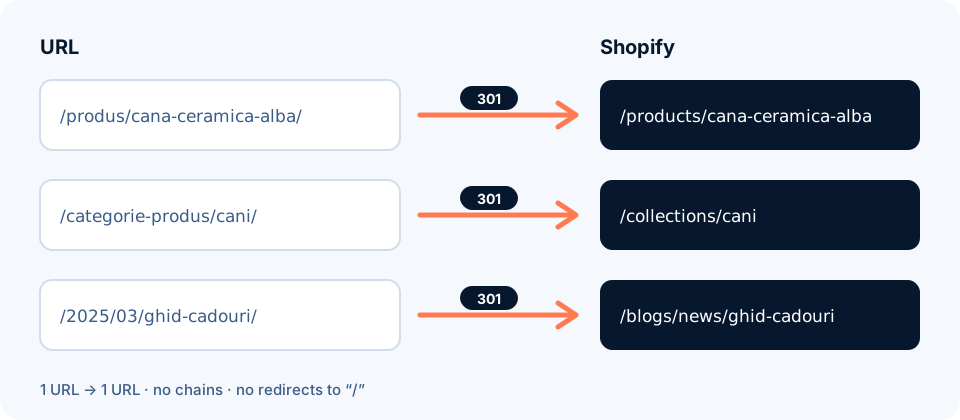
Shopify has a fixed URL structure: products always live under /products/, categories under /collections/, simple pages under /pages/ and posts under /blogs/blog-name/. You can edit only the final part (the handle), not the prefix (TinySEO). In practice, almost every old address changes.
| Page type | WooCommerce example | Shopify equivalent |
|---|---|---|
| Product | /product/white-ceramic-mug/ | /products/white-ceramic-mug |
| Category | /product-category/mugs/ | /collections/mugs |
| Page | /about-us/ | /pages/about-us |
| Post | /2025/03/gift-guide/ | /blogs/news/gift-guide |
The fix is a 301 (permanent) redirect for every old address. It tells Google and the browser: “this page has moved here for good.” A visitor arriving from an old link, a review or a Google result lands straight on the right product instead of an error page.
5 mistakes that cost traffic
1. Sending every old address to the homepage
It’s quick, but Google explicitly discourages redirecting many old URLs to an unrelated page such as the homepage. A shopper searching for “white ceramic mug” lands on the homepage and leaves.
2. Redirect chains
A → B → C → D. Every hop slows the page and dilutes the signal. Google recommends pointing each old address straight to its final destination.
3. Forgetting the “small” pages
Old blog posts, filtered category pages, PDFs, indexed images. These often bring steady traffic from niche searches. Export the full list from Google Search Console, not just your site menu.
4. Deleting redirects after a few months
Google recommends keeping them for at least a year (John Mueller, via Search Engine Journal). On Shopify it costs nothing to keep them forever.
5. Not updating internal links and Search Console
Menus, buttons and text that still point to old addresses create needless redirects. And without a new sitemap submitted in Search Console, Google takes longer to discover the new structure.
The 7-step plan
- Full URL inventory. Collect addresses from your sitemap, Google Search Console (Performance → Pages), Google Analytics and your current platform’s export. Note which pages bring the most traffic and sales.
- The redirect map. For every old address, choose its new equivalent. Keep the same handle where you can:
/product/white-mugbecomes/products/white-mug. The generator below gives you a first draft. - Data import. Shopify offers the free Store Migration app, which imports products and customers from platforms such as WooCommerce, Wix, Etsy or Square, or from CSV files. Check images, descriptions and variants manually after the import.
- Redirect import. In the admin: Content → Menus → URL redirects → Import, then upload the CSV file. Download the official template from the same page to compare the format.
- Test before launch. Check at least your top 20–50 pages by traffic: does the right page open? Is the response a 301, not a 302? Are there no chains?
- Launch and Search Console. Point the domain to Shopify, submit the new sitemap (
/sitemap.xml) and check a few addresses with the URL Inspection tool. If the domain changes too, also use the Change of Address tool. - Monitor for 4–8 weeks. Track 404 errors, indexed pages and clicks. A few weeks of fluctuation is normal, says Google; a decline that keeps going after that points to forgotten addresses.
Free tool: your redirect CSV file
Paste your old URLs, get the file for Shopify
One URL per line (full address or just the path). The generator recognises common WooCommerce/WordPress patterns and suggests a destination. You can edit any destination before downloading. Everything runs in your browser; we don’t send your data anywhere.
| Redirect from | Redirect to (editable) |
|---|
Note: the result is a starting point. Check every row, especially pages with no direct equivalent, and compare the format with Shopify’s official CSV template before importing.
Quiz: how ready are you to migrate?
6 questions, 1 minute
Answer the questions to see your score.
FAQ
Will I lose my Google rankings if I move my store to Shopify?
Not necessarily. If every old URL has a 301 redirect to its matching new page, Google gradually transfers the signals. A few weeks of fluctuation is normal, according to Google Search Central.
How long should I keep 301 redirects?
Google recommends at least one year. For visitors, keeping them permanently is best: old links in reviews, forums or emails will keep working.
Can I keep exactly the same URLs on Shopify?
Usually not, because Shopify uses fixed prefixes (/products/, /collections/, /pages/, /blogs/). You can keep the final part of the address, which keeps the redirect map simple and clear.
When is a good time to migrate?
During a quieter sales period. Avoid the Black Friday to Christmas window. Prepare everything now and launch in January or February.
How many redirects can I create in Shopify?
Up to 100,000 on regular plans and up to 20,000,000 on Shopify Plus (Shopify Help Center). For a small or medium store, the limit isn’t an issue.
Sources
- Google Search Central – Site moves with URL changes
- Search Engine Journal – Google: Keep 301 Redirects In Place For A Year (02.12.2021)
- Shopify Help Center – Creating and managing URL redirects
- Shopify App Store – Store Migration
- TinySEO – Shopify URL structure, limitations, and SEO
- Wall-Street.ro – Romania’s e-commerce sector estimated at €13.5 billion in 2026 (in Romanian, 15.10.2026)
Want to move your store to Shopify stress-free?
We handle everything: the URL inventory, product import, 301 redirects, automations and post-launch checks. You get a free mockup of your new store and a price estimate.
Request a quote or a free mockup